
Scenes
Open Tools, then Scenes. The screen has two separate libraries:
- The mixer’s own library at the top. These are the scenes and snapshots stored on the mixer itself, the same ones you would see on its own screen or editor.
- The OpenFader local library below it. These are stored on this device, not on the mixer.
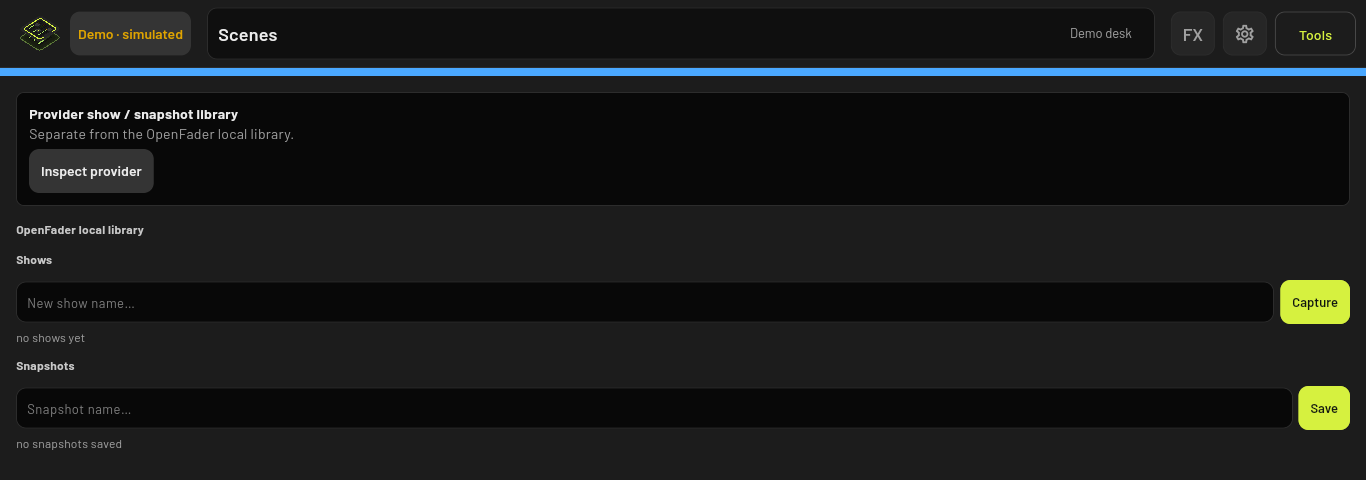
OpenFader snapshots
Snapshots are quick numbered saves of the whole mix.
- Save: type a name in Snapshot name… and tap Save. It goes into the next free number, from 001 to 999.
- Recall: tap RECALL on a snapshot, or tap its name, then confirm. Faders move to their saved positions over a short fade.
- Rename and Delete are on each snapshot. Clear all deletes every numbered snapshot after asking you.
OpenFader shows
Shows let you keep a named set of scenes, for example one show per service or per band.
- Tap New show, type a name, and tap Capture to save the current mix as the first scene.
- With a show selected, type a scene name and tap Capture to add more scenes.
- Tap Recall next to a scene to load it, or Delete to remove it.
Capturing with a name that already exists asks before replacing it.
The mixer’s own library
What you can do here depends on the mixer.
- Tap Inspect provider to read what is stored on the mixer.
- Tap the refresh button to read the current slot names. Buttons that change the mixer stay greyed out until this has finished.
- Use Recall, Rename, Delete or save options on each slot. Every change asks you to confirm first.
Behringer X Air: 64 snapshot slots. Recall scope on a slot lets you choose which parts come back: channels and outputs, effects, parameters and global settings. The mixer does not confirm recalls, so tap refresh before doing anything else.
Mackie DL32S: the stored show, with positions 1 to 99 and a protected Default 0 that can only be recalled. Save native show ZIP keeps a copy of the show file on this device. Import ZIP for inspection opens a show file to look at without sending anything to the mixer.
Behringer X32: desk scenes, snippets, cues and library presets, plus export and import of OpenFader archive files. These are not the same as files saved to a USB stick at the desk.
Things to know before the gig
- Recall is not checked afterwards. OpenFader sends the recall, but does not read every value back to confirm it landed. The message after a recall says so.
- Safes are not checked. OpenFader does not apply or verify recall safes from your mixer.
- Local snapshots and shows cannot be exported. Backups in Settings do not include them either. They stay on the device that saved them.
- Access limits turn this screen off. With any access limit active, Scenes is unavailable, because a recall could change controls that are meant to be locked.
- “Local memory only” after a save means the library could not be written to the device’s storage. That save is lost when the app restarts.